Starting up in Microsoft Fabric is easy, right? Create a Fabric Capacity, create a workspace and just start building. While this may be true for small scale deployments, as your organization grows and more users start to leverage Fabric, you may outgrow your initial design. Having a thorough understanding of Fabric capacities and workspaces along with your current and future goals for data, analytics and AI are essential for designing a scalable and performant environment.
Capacity and workspace design:
- Must support organizational growth and changing requirements
- Impacts Fabric workload and Power BI report performance by enabling better resource allocation and utilization
- Provides more options for scalability -> Scale up vs Scale out
- Facilitates collaboration, data governance, and integration with other systems and services
- Affects security and permissions management
- Is integral in CI/CD and DevOps practices
- Enables better cost management
In this blog, we will:
- review Fabric capacity and workspace concepts and considerations for designing a scalable, performant, and secure environment
- cover key questions to pose around your current and future requirements, personas, and CI/CD practices
- review typical architectural patterns for Fabric capacities and workspaces
With this knowledge, you will be better equipped to design a Fabric environment that meets your organization’s needs both now and in the future.
Key concepts around Fabric Capacities and Workspaces
Fabric Capacities
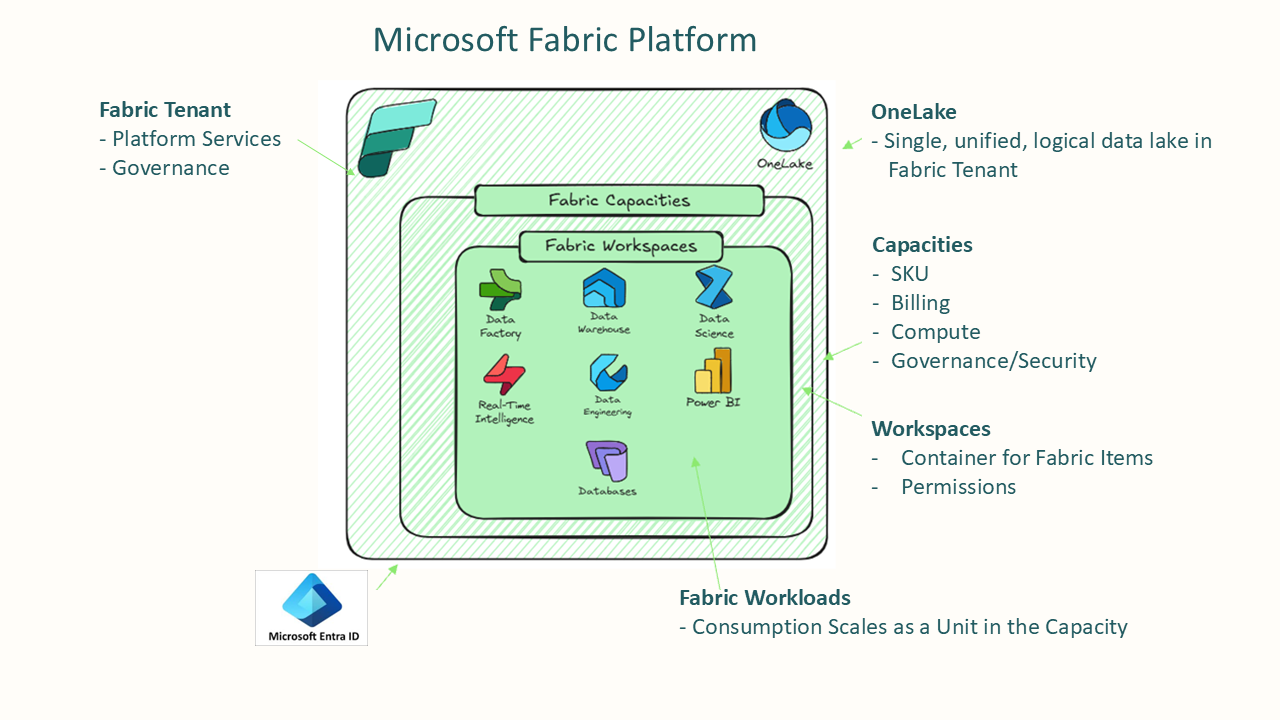
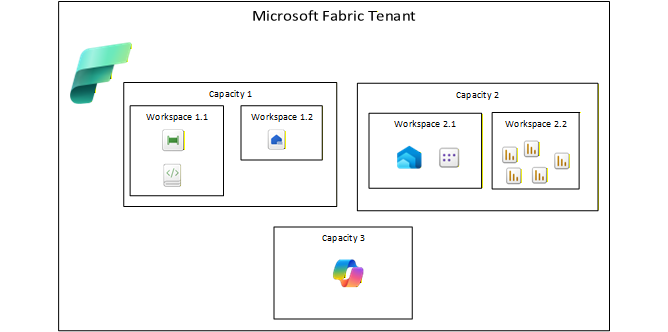
Fabric Capacities are the backbone of resource allocation in Microsoft Fabric and come in a variety of sizes. Capacities are dedicated resources for running Fabric workloads, ensuring optimal performance and reliability.
Fabric Capacity Compute
All Fabric items on a single capacity share the capacity compute. For example, if a Fabric pipeline calls a SQL script in a Data Warehouse on the same capacity, both the script consume compute from that single capacity. If performance was slow on the SQL script, you may need scale up or scale out the capacity. In contrast, if an Azure Data Factory pipeline calls an Azure SQL DB script, the pipeline would use an Azure Integration Runtime compute for pipeline activities and the Azure SQL DB compute for SQL script execution. For performance issues with Azure SQL DB, you would just scale up the compute for a single resource, the Azure SQL DB.
Key to optimizing Fabric capacity cost and performance is finding the “sweet spot” where workload needs are met. A guideline for capacity usage to be less than 80% utilized under normal conditions but to not be underutilized either. Consider the following:
- Size capacities to meet the needs of normal operations and understand how to handle peak loads.
- Bursting and smoothing allows capacities to keep running workloads when temporary spikes occur rather than failing or slowing down
- Bursting allows operations to temporarily exceed capacity limits
- Smoothing evens out capacity resource usage over time
- Throttling can occur when workloads exceed capacity limits for extended periods and could eventually lead to request rejections
- Surge protection can be turned on to prevent sudden spikes from overwhelming the capacity and reduces the risk of throttling for - Autoscale for Spark allows you to run Spark workloads on a pool outside of the Fabric capacity, removing that workload from the Fabric capacity
- Bursting and smoothing allows capacities to keep running workloads when temporary spikes occur rather than failing or slowing down
- Consider how different workloads on the same capacity may impact each other. Most Fabric items can work across workspaces
- Fabric Capacity reservations save costs for long-term usage compared to pay-as-you-go pricing. Reservations can also be split or consolidated across multiple capacities. For example, an F128 SKU reservation can be used for a single capacity or split into two F64 SKUs OR 1 F64, 1 F32, and 2 F16s OR even an F120 and an F8. This provides flexibility in managing capacity resources as organizational needs evolve. But before you purchase reservations, be sure to analyze your current and projected usage to determine the appropriate size and duration of the reservation.
- Optimize all workloads including semantic model design and use built in features like the Native Execution Engine (NEE) for Data Engineering
- Consider timing on workloads
- For example, if pipelines run only in off hours, having semantic models on the same capacity may not be an issue. However, if pipelines run during business hours, they may impact report performance
- Even if the workloads initially reside on the same capacity, consider future needs by designing workspaces so they can easily be moved to a different capacity if needed (more on that later)
- Monitor capacity usage and performance regularly to identify bottlenecks and optimize resource allocation
- Use Capacity Metrics in the Fabric Admin Portal to monitor usage and performance
- Set up alerts for high usage or performance issues to proactively manage capacity resources
Check the Fabric Roadmap frequently for upcoming features that may impact capacity management, such as Fabric capacity overage billing, due for public preview in Q1 2026.
Capacity Regions
Capacities can be created in different regions to meet data residency and compliance requirements and to minimize latency. When selecting capacity regions, consider the following:
- Data residency requirements
- Ensure that data stored and processed in Fabric complies with local regulations by selecting appropriate capacity regions
- For example, if your organization operates in the European Union, you may need to create capacities in EU regions to comply with GDPR regulations
- Latency considerations
- Choose capacity regions that are geographically close to your users and data sources to minimize latency and improve performance
- For example, if most of your source data resides in Asia while most of you analysts are in North America, you could locate your lakehouse in Asia for data ingestion and processing, then create a separate capacity and workspace in North America for reporting and analytics
Cost Management
Like other Azure resources, Fabric Capacities can be tagged for cost allocation and tracking. If different departments need to account for their Fabric costs separately, setting up separate capacities and tagging them appropriately can simplify cost management.
Workspace Design Considerations
Workspaces in Microsoft Fabric are logical containers for organizing and managing your data, analytics, and AI assets.
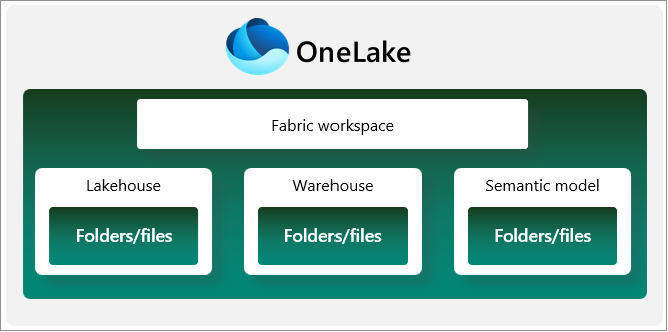
Workspaces provide a way to group related items together, control access and permissions, and facilitate collaboration among team members. When designing workspaces, consider the following:
- Workspaces can easily be moved between capacities in the same region
- Even if you start with a single capacity, consider organizing your Fabric items in different workspaces that may benefit from running on a separate capacity in the future. One example is putting reports and semantic models in separate workspace(s) than pipelines and Spark jobs, especially if the pipelines and Spark jobs are resource intensive and/or run during business hours
- Consider potential latency or compliance issues as discussed earlier with users or data in different regions. You cannot simply move a workspace to a capacity in a different region - you would need to recreate the workspace and its contents in the new region - so make sure to plan accordingly
- Limit access to workspaces
- Use Power BI Apps to share reports and dashboards without giving report consumers access to the workspace itself
- Segregating Fabric items into different workspaces based upon access needs can simplify security and governance; For example, creating a workspace for power users to build their own reports over semantic models from a governed workspace
- Assign item level access to Fabric items such as a Lakehouse or Semantic model rather than giving users access to the entire workspace
- Read more about OneLake and Fabric security here
- Consider the impact of workspace design on CI/CD and DevOps practices
- Git repos are at the workspace level
- Workspaces are used separate development, testing, and production environments
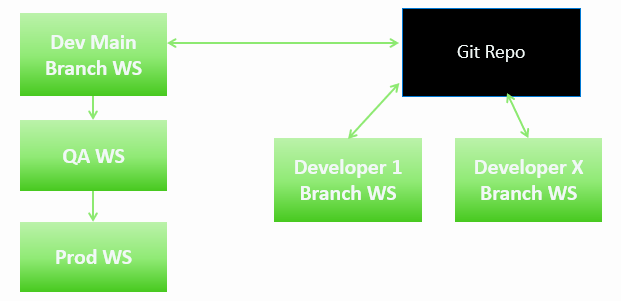
- Use deployment pipelines to automate the deployment of items between workspaces
- Leverage variable libraries to manage environment-specific settings such as connection strings
As we move on to the next section, reviewing your current and future requirements, keep in mind the considerations above around capacity consumption and workspace capabilities.
Discover Current and Future Fabric Requirements
Before designing your Fabric capacities and workspaces, it’s essential to understand your organization’s current and future needs. We’ll cover key questions to ask around:
- Current Business Use Cases and Fabric Environment
- Future Goals for Fabric
- Personas using Fabric
- CI/CD Environment
- Current and Future Data Architectures
To help with your Fabric discovery process, I created an Excel template to help answer and document these questions. You can download the template here. Below is an overview of the questions to consider:
Fabric Today
What’s going on in your Microsoft Fabric environment today?
- What are current business use cases?
- What are your deliverables?
- What are your data sources?
- What are you using for source control and CI/CD?
- Do you have any architecture diagrams? Ensure they are up to date.
- What are your challenges?
What Fabric experiences are you using and for what purpose?
- Power BI reports
- Semantic models – Direct Lake, Import, Direct Query
- Lakehouse
- Data warehouse
- Mirroring
- Pipelines
- Spark
- Event hubs, RTI, KQL
- SQL Database
- Cosmos
- Data Bricks
- AI
- Dataflows
- Copilot
- Best practice for Copilot is to have a separate capacity for Copilot workloads to avoid impacting other workloads
- This can be even be an F2 capacity since Copilot uses the capacity where the data resides
- The Copilot capacity is only used for billing and allows you to control Copilot usage so it does not impact other workloads or cause unexpected costs
- Best practice for Copilot is to have a separate capacity for Copilot workloads to avoid impacting other workloads
- Other
What is the state of your current capacities?
- What Fabric Capacities do you have now?
- How are workspaces currently aligned?
- Do you have any reservations?
- What workloads are using the most capacity?
- What is your normal capacity utilization?
- Are there any issues with capacity throttling?
- Do you have any surge protection or autoscale enabled?
- How are you monitoring capacity usage and performance?
- How do you anticipate your capacities/workspaces to grow?
- Are there times when the capacities not being used?
- Or are there times when they are in high demand?
- What reports have the most consumption?
- Are there any spark jobs that are resource intensive?
Fabric Future
What are your goals for the next 6-12 months?
- What are your business use cases you wish to implement in the next 6 months?
- For each use case, what is the priority and timeline?
- What features are you considering and for what use case? For example…
- Enterprise Data Warehouse for Reporting
- Lakehouse For Reporting
- Lakehouse for Data Science
- RAG over Power BI Data
- Integration with Azure AI Foundry
- Operational Workloads
- Near-RealTime Reporting
- Near RealTime Alerting
- Other
What are your goals beyond 12 months?
- What are your business use cases you wish to implement a year from now?
- For each use case, what is the priority and timeline?
- What features are you considering and for what use case? For example…
- Enterprise Data Warehouse for Reporting
- Lakehouse For Reporting
- Lakehouse for Data Science
- RAG over Power BI Data
- Integration with Azure AI Foundry
- Operational Workloads
- Near-RealTime Reporting
- Near RealTime Alerting
- Other
Fabric Users Personas
Business Personas
Some typical Fabric user personas within organizations include:
- Consumers of Power BI Reports Only
- Business Report Writers
- Super Users
- Those who create report content, semantic models, query data with SQL, other Fabric experiences
- Executives
- External Users
IT
- Data engineers
- AI Engineers
- DBAs
- App Dev
- Infra
- IT Managed Report Developers
- Data scientists – consuming data, training
Note: Best practice is to set up security groups for personas
What does your CI/CD environment look like?
- Do you have a CI/CD environment set up today?
- Are you using Github or Azure DevOps?
- How does or will your IT Team work together?
- Multiple contributors on single artifact
- Multiple contributors on same workspace but different artifacts
- What does or will your environments look like?
- Dev, Test, Prod
- Will super users be using source control and CI/CD for reports?
Workspace and Capacity Architectural Patterns
Based on your current and future requirements, you can start to design your Fabric capacities and workspaces. Here are some capacity and workspace patterns to consider:
Single Workspace with Single Capacity
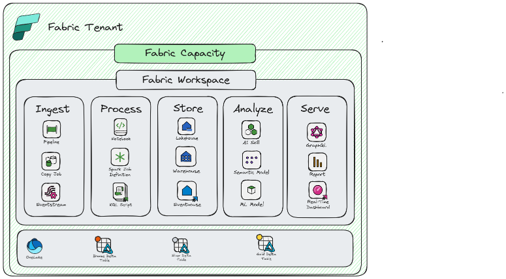
You should consider this pattern if:
- Smaller Solutions with relatively small data sizes and processing requirements
- There is no granular permission requirement in the workspace
- The solution can tolerate variability in SLAs and/or job completion times
- All data can reside in the same region
- Compute patterns are balanced and predictable
Considerations:
- Only option for scaling is to double the SKU
- Less complexity and overhead in workspace management
- Turn on Surge Protection to protect interactive operations
- Look at leveraging Autoscale for Spark
- Careful monitoring of capacity usage is important
- Number of CI/CD environments are reduced but can cause issues if you have dependencies between objects
- Network settings are shared across all items
Multiple Workspaces with Shared Capacity
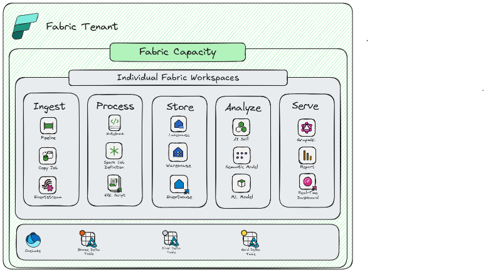
You should consider this pattern if:
- All workloads across all workspaces can share the same pool of compute
- Need to plan for future scale-out
- You need more granular control in securing items within a development team
- You want to decentralize ownership and governance
- All data can reside in the same region (even in a scale out event)
- Solution can tolerate potential throttling from Noisy Neighbor
Considerations:
- Allows flexibility for either scale up or scale out
- More complexity and overhead in workspace management
- Plan workspace design and naming conventions up front
- DevOps and CI/CD is more complex, but allows more flexibility
- Careful monitoring of capacity is important as solution scales
Multiple Workspaces with Dedicated Capacities
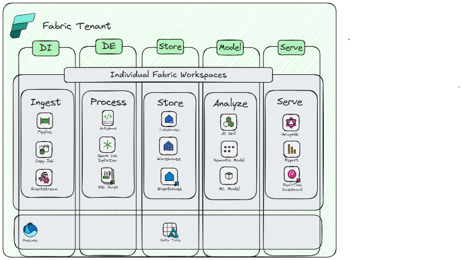
You should consider this pattern if:
- You have a large-scale enterprise implementation
- You have large data and/or complex data processing requirements
- You need full control over scaling and optimizing for different types of compute
- You have unpredictable compute patterns that might impact other workloads
- Data needs to reside in different regions
- Solution has mission critical needs and cannot tolerate variability in performance
- You want to implement a data mesh architecture for the organization (De-centralized ownership of data, domain driven ownership)
Considerations:
- Allows flexibility for granular control over compute allocation/scale
- Allows for workload isolation for different compute profiles
- Higher degree of governance, but with more flexibility/decentralization
- Cost and ownership of capacities can be completely federated
Example Medallion Architecture
In the example below, we have a medallion architecture with Bronze, Silver and Gold layers. Each layer is in its own workspace to provide better security and governance.
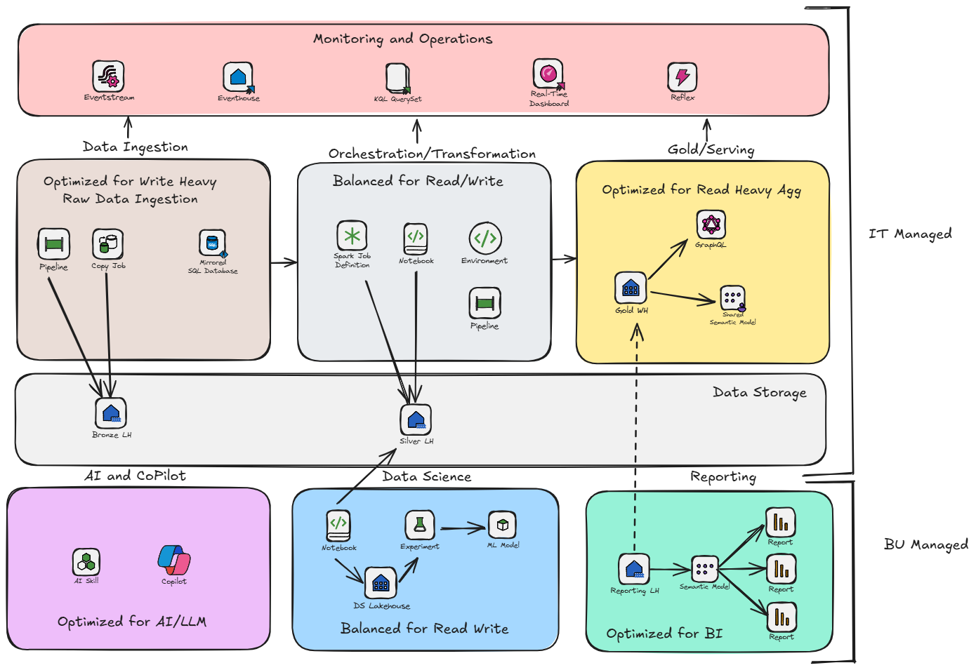
- The Bronze and Silver for Data Ingestion and Orchestration/Transformation workspaces are on a shared capacity since they have similar compute needs and can share resources.
- The Gold and Reporting workspaces are on a separate dedicated capacity since it has more interactive workloads that need to be isolated from the other layers for performance reasons. Another option is to have multiple workspace just for reports in order to allow create their own reports over governed semantic models.
- We also have a separate capacity for AI/Copilot. As mentioned earlier, best practice is to have a separate capacity for Copilot workloads to avoid impacting other workloads and control usage.
- For the Data Science workspace, it may have different compute needs and security requirements that warrant a separate capacity. You could also leverage Autoscale for Spark for Data Science workloads to optimize costs.
This design allows for better scalability, performance, and security while still being manageable from a DevOps perspective.
Conclusion
As you can see, designing Microsoft Fabric capacities and workspaces requires careful consideration of your organization’s current and future needs. By understanding key concepts around capacity consumption and workspace capabilities, asking the right questions about your requirements and personas, and leveraging architectural patterns, you can create a scalable, performant, and secure Fabric environment that meets your organization’s needs both now and in the future.
Special thank you to Holly Kelly for all the training and guidance she has provided on Microsoft Fabric Capacities and Workspaces! Plus she allowed me to lift some of her images and verbiage from her internal training materials! Also, be sure to read Microsoft Fabric deployment patterns in the Azure Architecture Center.